Official Windows Release

Blue Youtube MP3 Downloader

Blue YouTube Downloader lets you convert YouTube share links into high-quality MP3 files with a clean desktop workflow.

Stable Version 1.0.0 | Build Date: April 22, 2026

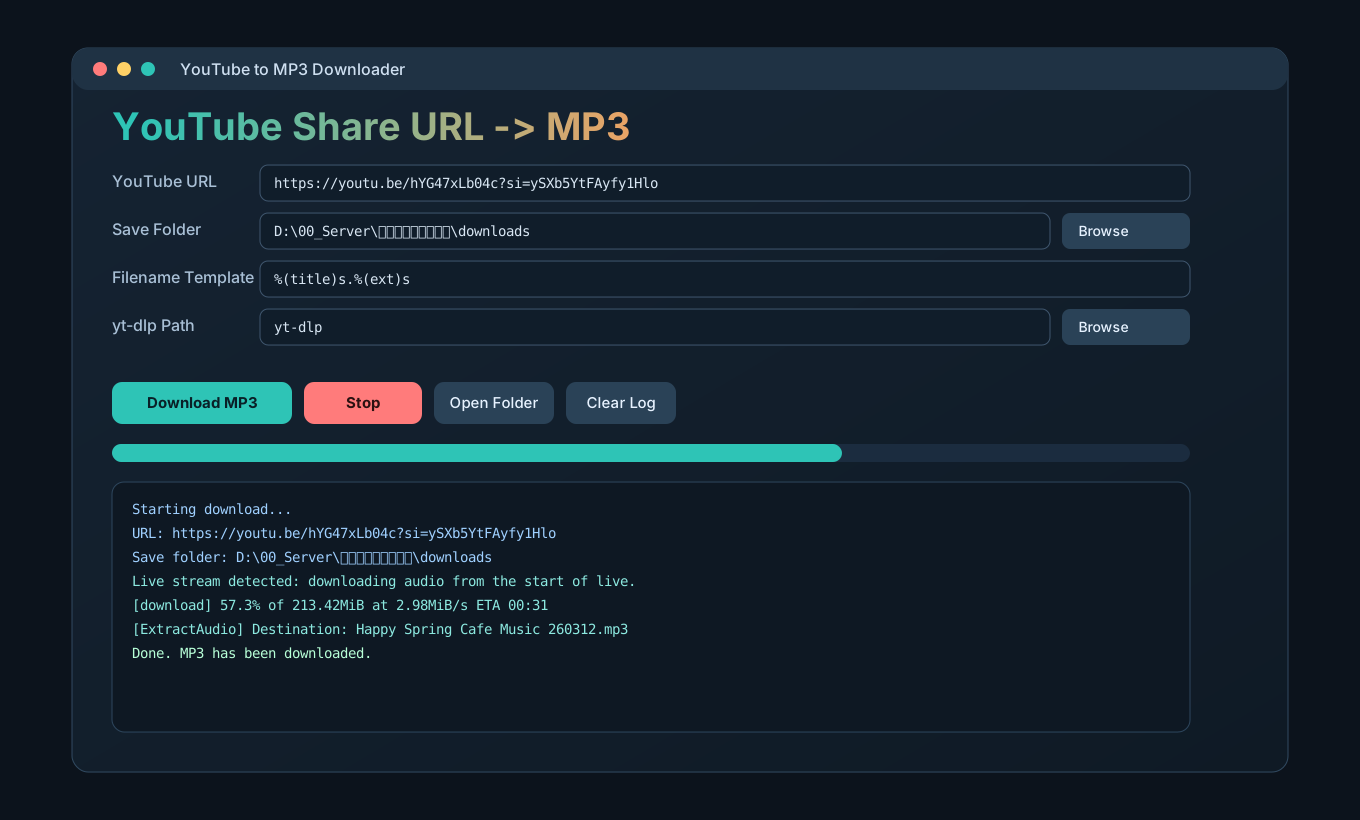
Program Screenshot

Desktop UI
Blue YouTube Downloader UI screenshot for 유튜브 MP3 다운로드

Version History

Release Notes

v1.0.0 (Current)

  • YouTube share URL to MP3 conversion for Windows.
  • Automatic package bootstrap on launch (`yt-dlp`, optional `ffmpeg` guidance).
  • Live stream handling support and improved Korean path rendering.
  • Stop button: cancel active downloads and clean partial files.

v0.9.0 (Preview)

  • Initial internal preview build.
  • Core audio extraction workflow validation.

Installation (English)

Step-by-Step
  1. Download the latest `.exe` using the button at the top of this page.
  2. Place the executable in a folder such as `C:\\Apps\\BlueYouTubeDownloader`.
  3. Run the file. If SmartScreen appears, click More info and then Run anyway.
  4. The launcher checks dependencies. If `ffmpeg` is missing, follow the prompt to install it.

Optional manual installation commands:

python -m pip install -U yt-dlp
winget install --id Gyan.FFmpeg -e

How to Use (English)

Quick Start
  1. Copy a YouTube share URL (example: `https://youtu.be/...`).
  2. Paste it into the YouTube URL field.
  3. Select an output folder in Save Folder.
  4. Click Download MP3.
  5. Monitor progress in the log area.
  6. Use Stop to cancel; partial files are removed automatically.

FAQ

Support

Does it support live links? Yes. The app detects live stream states and applies appropriate handling.

Why do I see dependency warnings? The app requires external tools (`yt-dlp` and `ffmpeg`) for audio processing.

Legal notice: Use this software in compliance with YouTube Terms of Service and local copyright laws.